In order to do some analysis on this, I did a "select all" of the scrollback buffer, copy-and-pasted into a text file. I then asked Claude Code AI to analyze the file. Claude generated the following. Due to privacy issues I'm not attaching the file, nor a normal raw File->Open LOG type capture in AT; these files have been sent to Brian Pence's private email address.
Absolute Telnet -- Scrollback Duplication on Copy/Paste
=======================================================


SUMMARY

When using "Select All" / "Copy" from the Absolute Telnet scrollback
buffer during an SSH session running Claude Code (Anthropic's CLI tool),
the captured text contains large blocks of duplicated content. The
duplicated blocks appear to be triggered by ANSI cursor-movement
sequences that Claude Code uses to update the display in-place
(collapsing tool output, updating progress indicators, etc.).


ENVIRONMENT

  SSH Client:          Absolute Telnet 13.16 RC21
  Remote Application:  Claude Code (Anthropic CLI), running over SSH
                       on a Raspberry Pi (Linux 6.12, bash)
  Session Type:        Interactive AI-assisted coding session,
                       approximately 3960 lines of captured output


OBSERVED BEHAVIOR

A copy-and-paste of the full SSH session scrollback contains 6 copies
of a 497-line block that should appear only once. The total captured
output is 3960 lines, but only approximately 1475 lines are unique
content. The remaining ~2485 lines are duplicates.


Block structure in the captured text:

  Block   Line Range    Repeated Base   Unique New Content
  -----   ----------    -------------   ------------------
    1       1-573        497 lines        76 lines
    2     574-1166       497 lines        96 lines
    3    1167-1864       497 lines       201 lines
    4    1865-2571       497 lines       210 lines
    5    2572-3272       497 lines       204 lines
    6    3273-3960       497 lines       191 lines

Each block starts with an identical copy of the same 497 lines
(verified byte-for-byte via diff), followed by a progressively larger
section of new, unique content representing the ongoing session output.


Boundary where duplication begins:

The first repetition starts at line 574. The boundary falls in the
middle of a unified diff display:

  Line 573:  7 -VERSION=26.074.19.34      <-- last "new" line before repeat
  Line 574:  7 +VERSION=26.074.19.50-1    <-- identical to line 1; repeat starts here

Line 574 is simultaneously the "plus" side of the diff AND a repeat of
line 1 of the entire session. This is the point where Claude Code would
have been updating the screen (collapsing a tool-output display after
an edit operation completed).


LIKELY CAUSE

Claude Code makes extensive use of ANSI escape sequences to update the
terminal display in-place:

  - Collapsing tool output: When a tool call finishes, multi-line
    verbose output is replaced with a single summary line (e.g., a
    file diff collapses into "Update(/dropbox-nix/tls.sh)")

  - Progress indicators: Status lines like "Cogitated for 35s" are
    updated in-place using cursor movement

  - Screen redraws: Replacing N lines of output with fewer lines
    requires cursor-up, erase-line, and rewrite sequences

The relevant ANSI sequences likely include:

  Sequence    Function
  --------    --------
  ESC[nA      Cursor up n lines
  ESC[nF      Cursor to beginning of line, n lines up
  ESC[2K      Erase entire line
  ESC[nJ      Erase display (below cursor, or entire)
  ESC[nG      Cursor to column n
  CR          Carriage return (overwrite from start of line)


HYPOTHESIS

When Claude Code sends cursor-movement sequences to collapse or redraw
content, Absolute Telnet appears to be appending the redrawn content to
the scrollback buffer as new lines rather than updating the existing
scrollback entries in-place. Each redraw event causes the visible screen
content (or a portion of it) to be duplicated into the scrollback.

When the user subsequently does "Select All" and copies from the
scrollback, these duplicated renders are all included in the copied
text.

Evidence supporting this hypothesis:

  1. The repeated base block is exactly 497 lines -- a plausible match
     for the visible terminal area plus some scrollback context that
     gets redrawn.

  2. Repetitions occur at points where Claude Code collapses tool
     output -- specifically, at diff displays being collapsed after
     edit operations complete.

  3. Each block contains the same base followed by growing amounts of
     new content -- consistent with periodic re-renders at different
     points in the session, each capturing the original scrollback
     plus whatever new output has been added since the last re-render.

  4. The base block is byte-for-byte identical across all 6 occurrences
     -- this is a verbatim copy, not a similar-but-different rendering.

  5. The string "Cogitated for 35s" appears 6 times (at lines 432,
     1005, 1598, 2296, 3003, 3704) -- once per block, always at the
     same offset within the repeated base section.


HOW TO REPRODUCE

  1. Open an SSH session in Absolute Telnet to a Linux host.
  2. Run Claude Code ("claude") and perform interactive tasks that
     involve tool calls (file edits, command execution) -- these
     trigger the collapse/expand behavior.
  3. Let the session run long enough that multiple tool-output collapse
     events occur.
  4. Use "Select All" / "Copy" to capture the scrollback.
  5. Paste into a text editor and search for content that should be
     unique -- it will appear multiple times.


EXPECTED VS. ACTUAL BEHAVIOR

  Expected: "Select All" / "Copy" from scrollback produces a linear
            transcript of the session with each line appearing once.

  Actual:   Scrollback contains multiple copies of earlier content,
            inserted at points where the remote application used
            cursor-movement sequences to update the display.


COMPARISON

This issue does not occur when copying the same session output from
other terminal emulators (e.g., the native terminal on the host
machine), suggesting the issue is specific to how Absolute Telnet
handles cursor-movement sequences in its scrollback buffer.
Hey Todd!!! After reviewing the data Claude streams to the terminal, I've found a few issues with Absolute.. Claude REALLY REALLY puts the terminal through the wringer!!!
1. The PRIMARY problem is a missing escape sequence. Escape sequences Absolute doesn't recognize just get ignored. Claude is using an xterm specific extension to clear the entire scrollback history. Absolute misses that, so junk piles up in the scrollback history
2. 'FAINT' font attribute... Also ignored when encountered, can make a difference in color or shading, especially with code context colorization.
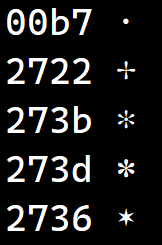
3. Fonts missing glyphs. Claude uses four different types of asterisk-like glyphs ( ✻✽✶* ) When these are missing from the font they get the 'default' glyph, usually a square and things don't look right. The solution usually involves trying other fonts with better glyph coverage, but in some of these cases, I can at least use a fall back character (* asterisk) so it looks reasonably well laid out. Not limited to asterisk, but you get the idea.
I have improvements in the works for all of the above, but it may be Monday before they're done.
Brian
Todd,
I've made some substantial improvements that make Claude Code render much better. You can pick up RC22 at the beta testing link below.
There have also been a substantial number of other improvements intended to stabilize multi-threaded interaction behavior plus improved shutdown behavior. If they work, you shouldn't notice any difference, but if you encounter anything quirky or wrong, let me know.
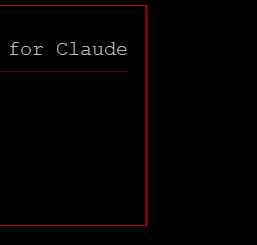
Improvements: 'Faint' text helps context colorization

Rounded corner glyphs for box drawing
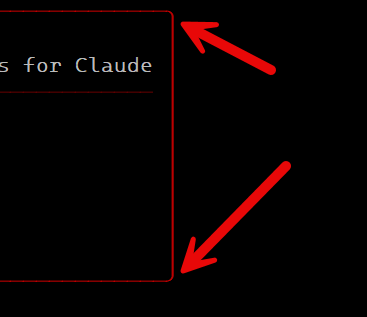
Fallback to square corners if not supported by font, etc...
https://www.celestialsoftware.net/beta-testing/
RC22has been installed and will do some testing today. btw, thank you for including the beta url when you announce new versions 😀
RC22 has substantial improvements. i'll be sending a debug log and plain copy-and-past capture via private email. here is claude's new analysis. i can't seem to get the forum editor to preserve formatting for the columnar data -- code, source code and paste as plain text editor function icons don't preserve formatting. is there a way to force one of these functions to use a monospaced font? for now i'll attach as a plain text file.
You're right. RC22 didn't quite completely fix the scrollback clearing feature. I know what it is and should have a fix soon.
The updates are in! I had to tweak the implementation of scrollback clearing a bit. I also added enhanced detection of multi-line URLs to help when you have to click Claude links (below) that are very large.
Latest:
https://www.celestialsoftware.net/beta-testing/
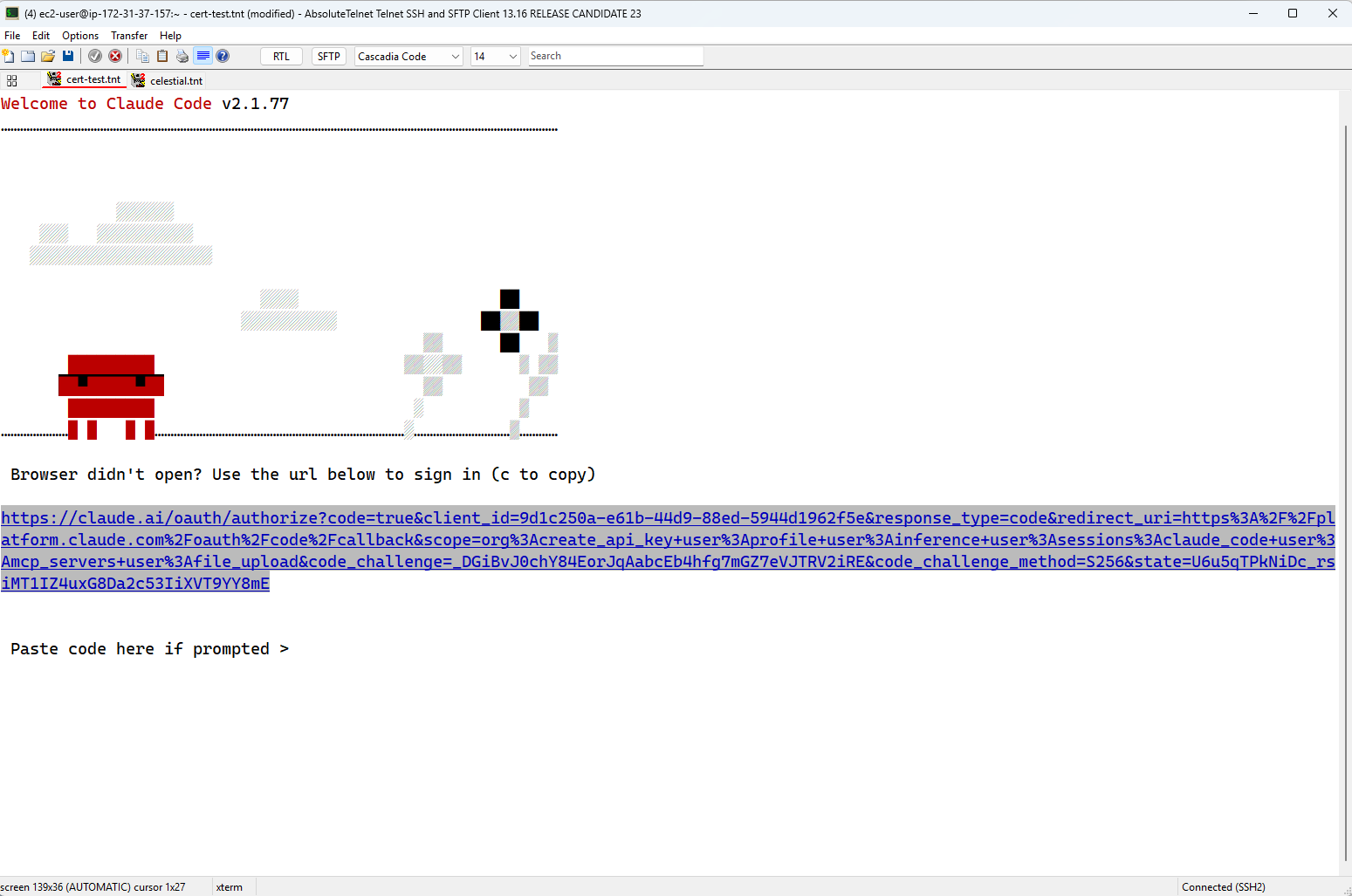
RC23 installed. i'll test and report back, probably sometime this weekend
not quite right yet but getting there. 😀 sent private email with details.
NEW UPDATE!!
Based on some back and forth with Todd, I've made the following updates for 13.16 RC24:
1. Implemented "Synchronized Output" (DEC private mode 2026) to take cues from the host on when to update (or not update) the screen as data is streaming. In combination with scrollback clearing, Claude uses this to reduce the screen clutter as screens are redrawn.
2. Enhanced multi-line URL identification to allow for 'margins'... spaces at the left and right of the screen that would otherwise 'break' the URL recognition.
3. ctrl-right-button-click now brings up the context menu even when 'normal' right-button-click is mapped to 'paste'. This isn't major, but is consistent with how some other terminals behave
4. Implemented "focus reporting" (DEC private mode 1004) that allows the terminal to tell the host when it has focus. Claude uses this for example to DRAW or HIDE the cursor
5. Implement color palette reporting (DEC private mode 2031) that allows the terminal to tell the hose when it is using 'dark' mode or 'light' mode. Claude requests this, but I can't tell exactly what it does DIFFERENTLY with it enabled.
6. Better implementation of glyphs used by Claude for animated cursors. Previously, when a font didn't have these, they'd all fall back to an asterisk (*) and the animation effect was lost
https://www.celestialsoftware.net/beta-testing/
Brian
thank you! RC24 installed. i'll test out the changes and report back in a day or three
RC24 appears to have resolved the issues with claude screen updates -- thank you! i did test putty and it seemed to handle claude screen IO just fine.
the multi-line URL detection is working great, as is the ctrl+right-click but i do have a question about the context menu -- how is "Goto Link (click)" different from the disabled "Go To URL (ALT+HOME)"?
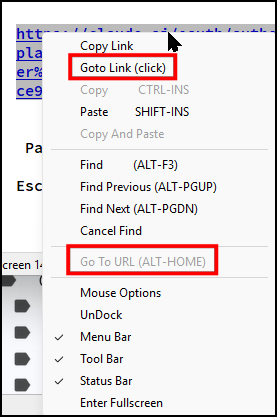
so far, so good using RC25. can you let me know how is "Goto Link (click)" different from the disabled "Go To URL (ALT+HOME)"?