The AbsoluteTelnet SSH Client implements the kitty keyboard protocol, the progressive-enhancement scheme originated by the kitty terminal that replaces the ambiguous legacy keyboard encoding inherited from hardware terminals. Because it is an SSH client, applications on a remote Linux host get unambiguous key reports over a plain SSH connection, with nothing installed on the Windows side beyond AbsoluteTelnet/SSH itself.
Support is current as of AbsoluteTelnet SSH Client 14.19 (first shipped in 14.02). All five enhancement flags, the full mode stack, and the query are implemented. This page documents exactly what is implemented, what is not, where the Windows keyboard model forces a decision the spec leaves open, and how to verify every claim yourself.
Why it matters
The legacy encoding cannot tell Esc from the start of an Alt chord, Ctrl+I from Tab, or Shift+Enter from Enter, and it has no notion of a key being released. Applications that ask for the kitty protocol get all of that back. Neovim, Helix, kakoune, fish 4, and Claude Code (which needs Shift+Enter for a newline) all enable it when the terminal says it can, and tmux 3.3 and later can request extended keys from the outer terminal. None of them need configuration: the application pushes the flags it wants, AbsoluteTelnet/SSH honours them, and the application pops them on exit.
Try it in 30 seconds
From any SSH session to a Linux host, using kitty’s own key inspector (no kitty terminal required, just the kitten binary):
kitten show-key -m kittyPress Shift+Enter, Ctrl+Shift+A, hold Ctrl+Left until it repeats, then let go. You will see the press, the repeats, and the release reported separately, each with its modifiers, exactly as the protocol page describes. Or ask the terminal directly and watch the reply arrive as keyboard input:
printf '\e[?u'
# reply: ^[[?0u   (flags 0: no application has pushed a mode)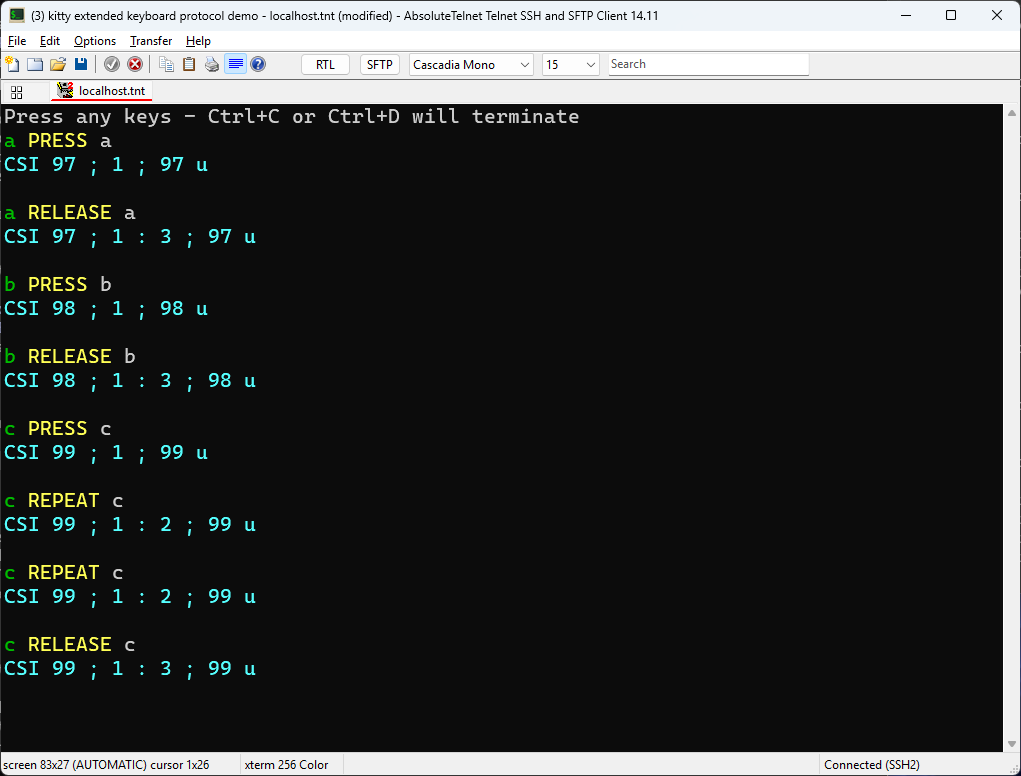
Feature support
Mode stack and query
| Feature | Sequence | Status |
|---|---|---|
| Push flags | CSI > flags u | Supported. Stack depth is 16; when a 17th entry is pushed the oldest is discarded, as kitty does |
| Pop flags | CSI < n u | Supported. n defaults to 1; popping past the bottom of the stack leaves flags at 0 |
| Set flags in place | CSI = flags ; mode u | Supported. Mode 1 replaces all flags (the default), mode 2 sets the given bits, mode 3 clears them |
| Query | CSI ? u | Supported. Replies CSI ? flags u with the current flags |
| Separate main and alternate screen stacks | Supported, per spec. The two screens keep independent stacks that swap on every alternate-screen transition | |
| Reset | RIS (ESC c), Options ▸ Reset Terminal | Both screens’ stacks are cleared and flags return to 0 |
Unknown flag bits are masked off on every push and set, so a future flag value is ignored rather than misinterpreted.
Progressive enhancement flags
| Flag | Value | Status |
|---|---|---|
| Disambiguate escape codes | 1 | Supported. Esc becomes CSI 27 u; text keys held with Ctrl, Alt or Super become CSI code ; mods u; modified arrow, navigation and function keys carry their modifier field; modified Enter, Tab and Backspace become CSI 13 ; mods u and so on. Unmodified Enter, Tab and Backspace keep their legacy bytes and plain text is still delivered as text, exactly as the spec’s exception list requires |
| Report event types | 2 | Supported. Press (1, omitted), repeat (2) and release (3) in the mods:event sub-field. See Key release below |
| Report alternate keys | 4 | Supported. The key field becomes code:shifted:base. The shifted key is included only while Shift is held; the base-layout key is the same physical key’s code point in the standard US PC-101 layout, and is included only when it differs. On a US layout the alternates collapse and the field stays a plain code point |
| Report all keys as escape codes | 8 | Supported. Every key becomes an escape code, including plain text (CSI 97 u for a), unmodified Enter/Tab/Backspace, and lone modifier presses (57441 to 57450). The lock keys are the one exception; see What isn’t supported |
| Report associated text | 16 | Supported. The text the key actually produced, with Shift and Caps Lock applied, is appended as the third parameter: Shift+A is CSI 97 ; 2 ; 65 u |
Functional keys
The encoding follows the protocol’s functional key table. Two details from that table that implementations commonly get wrong are handled as specified: F3 is CSI 13 ~, not CSI 1 ; mods R, because CSI R collides with the cursor position report; and the Menu key is CSI 29 ~.
| Key | Encoding |
|---|---|
| Escape | CSI 27 u |
| Enter, Tab, Backspace | CSI 13 u, CSI 9 u, CSI 127 u |
| Insert, Delete | CSI 2 ~, CSI 3 ~ |
| Up, Down, Right, Left | CSI 1 ; mods A / B / C / D |
| Home, End | CSI 1 ; mods H / F |
| Page Up, Page Down | CSI 5 ~, CSI 6 ~ |
| F1, F2, F4 | CSI 1 ; mods P / Q / S |
| F3 | CSI 13 ~ |
| F5 to F12 | CSI 15 ~, 17 ~, 18 ~, 19 ~, 20 ~, 21 ~, 23 ~, 24 ~ |
| Menu | CSI 29 ~ |
| Left Shift, Ctrl, Alt, Super | CSI 57441 u, 57442 u, 57443 u, 57444 u (report-all only) |
| Right Shift, Ctrl, Alt, Super | CSI 57447 u, 57448 u, 57449 u, 57450 u (report-all only) |
One observable choice: for the letter-terminated and tilde-terminated keys the modifier field is always present once the key is reported through the protocol, so an unmodified Up under report-all arrives as CSI 1 ; 1 A rather than CSI A. Both forms are valid under the protocol’s grammar and every decoder we have tested accepts both. Under disambiguate mode alone an unmodified Up keeps its legacy CSI A, as the spec allows.
Modifiers
| Modifier | Bit | Status |
|---|---|---|
| Shift | 1 | Reported |
| Alt | 2 | Reported |
| Ctrl | 4 | Reported |
| Super | 8 | Reported, from the Windows key. Windows itself intercepts many Win+key chords (Win+L, Win+D, Win+number and others) before any application sees them |
| Hyper, Meta | 16, 32 | Not applicable: Windows has no such modifiers |
| Caps Lock, Num Lock | 64, 128 | Deliberately not reported; see below |
Key release
With event types enabled, a release is emitted only for a key whose press was reported through the protocol. That rule matters on Windows: the key-up that lands after you Alt+Tab into the window would otherwise produce an orphaned CSI 9 ; 1:3 u release for a Tab the application never saw pressed. When the window loses focus, a synthetic release is sent for every key still held, as kitty does, so the application is never left with a stuck key. Auto-repeat is reported as event type 2 using the OS’s repeat flag, so the application sees the same press/repeat/release shape it would see under kitty.
What isn’t supported
- Caps Lock and Num Lock modifier bits (64 and 128). The protocol permits reporting them; AbsoluteTelnet/SSH does not, and this was a deliberate reversal after shipping them. Once Num Lock is on, every key carries
+128in its modifier field, and real applications stopped recognising ordinary keys. Most terminals omit these bits for the same reason, and the associated-text field already conveys the effect of Caps Lock. Correspondingly, the lock keys themselves (57358to57360) are never reported as key events, even under report-all: they change modifier state locally and are consumed. - Keypad-specific key codes (
57399to57425). Keypad keys are reported as what they produce: the digit or operator with Num Lock on, or the navigation key they alias with it off. An application cannot yet distinguish keypad 5 from the 5 on the main row. - Keys outside the table above. F13 to F35, Print Screen, Pause, and the media keys (
57361onward) are not reported through the protocol and fall through to legacy handling. Windows claims Print Screen and most media keys before a terminal window sees them in any case.
Notes for Windows keyboards
AltGr is text, not Ctrl+Alt
Windows delivers AltGr as Ctrl+Alt. On an AZERTY layout the backslash is AltGr+8, on a German layout the at-sign is AltGr+Q. A naive encoder reports those as Ctrl+Alt-modified keys, which no host application expects because X11 and Wayland terminals never see AltGr as Control+Alt. AbsoluteTelnet/SSH checks whether the layout produces a printable character for the key under the real modifier state; if it does, the user typed that character. Under disambiguate mode it is delivered as text, and under report-all it is reported as the glyph with no Ctrl or Alt bits, which is what kitty reports for an ISO Level 3 Shift character. Genuine Ctrl+Alt chords are unaffected because the layout produces nothing printable for them. The same rule applies to the xterm modifyOtherKeys encoder. This was fixed in 14.19 after a field report of vim showing <9f> for a backslash on a Belgian layout.
Reserved local shortcuts
kitty reserves its own clipboard and window shortcuts even when an application has the protocol enabled. AbsoluteTelnet/SSH does the same for a small, fixed set:
- Ctrl+Insert, Shift+Insert, Ctrl+Shift+C and Ctrl+Shift+V stay local copy and paste.
- On the main screen only, Ctrl with Page Up, Page Down, Up, Down, Home or End scrolls the local scrollback. On the alternate screen, where full-screen applications run, those chords go to the application.
Everything else, including Ctrl+C, goes to the application as the protocol specifies. In disambiguate mode Ctrl+C is CSI 99 ; 5 u, not the raw 0x03, and it is the application’s job to act on it.
Notes for SSH sessions
The keyboard protocol is entirely in-band, so it needs nothing from SSH beyond an ordinary channel: the application’s push and pop travel as terminal output, and the key reports travel back as terminal input. It is honoured when the session’s terminal type is one of the xterm family (xterm, xterm 256 Color, xterm direct). Sessions configured as VT100, VT220 or another non-xterm type get the legacy encoding regardless of what the application requests.
Coexistence with xterm modifyOtherKeys
Older applications, vim among them, ask for xterm’s modifyOtherKeys (CSI > 4 ; level m) instead. AbsoluteTelnet/SSH implements levels 1 and 2 of that too, including formatOtherKeys to choose between the CSI 27 ; mods ; code ~ and CSI code ; mods u wire forms, and the matching queries. When an application has pushed kitty flags, the kitty encoder takes precedence; when the kitty flags are 0, modifyOtherKeys applies. An application that enables both gets the kitty encoding, which is what it asked for last.
When an application exits without popping
A remote application that crashes, or is killed by a dropped connection to a multiplexer, can leave its flags pushed. Three things limit the damage:
- Full-screen applications run on the alternate screen, and the main screen has its own stack. Leaving the alternate screen restores the main screen’s flags, normally 0, so a bare Ctrl+C at the shell prompt works again immediately.
- Under disambiguate mode, unmodified Enter, Tab and Backspace keep their legacy bytes and text is still text, so you can type
resetand press Enter. The terminal reset it sends clears the stack. - If an application leaves report-all mode on the main screen, typing itself is escaped, so use Options ▸ Reset Terminal. It performs the same hard reset as
ESC c.
Terminal multiplexers
tmux does not forward the kitty protocol as such. From 3.3 it can request extended keys from the outer terminal with extended-keys on, and tmux 3.5 adds extended-keys-format csi-u so that the keys it forwards to its panes use the same CSI u form. Inside tmux, what an application sees is therefore tmux’s own encoding, not AbsoluteTelnet/SSH’s. The protocol page’s quickstart shows the query an application should make on startup; applications that follow it will detect tmux correctly.
Verifying these claims
Everything above is testable with public tools:
kitten show-key -m kitty(from the kitty distribution) pushes all five flags and prints every event it receives, decoded. This is the reference tool and exercises the mode stack, event types, alternate keys, report-all and associated text at once.- Neovim 0.10 or later queries the terminal on startup and enables the protocol when the reply comes back. Ctrl+I and Tab become distinct mappings, and Esc is recognised without the timeout.
- Claude Code over SSH: Shift+Enter inserts a newline instead of submitting. The shell prompt before and after keeps its plain Ctrl+C because the flags are per-screen. See our Claude Code article.
- Helix and fish 4 enable the protocol unconditionally on supporting terminals and are good checks that Ctrl+Shift and Alt chords arrive intact.
- Any shell:
printf '\e[?u'to see the current flags, andprintf '\e[>1u'followed by a few keys andprintf '\e[<u'to see disambiguate mode on and off by hand.