From time to time, you’ll find here the latest changes and newest features for what will come in the next release. These ‘release candidates’ have a limited lifespan, an expiration date. Not to be confused with your 30-day demo period, release candidates expire on a specific date that it will announce to you each time you run it, something like this:
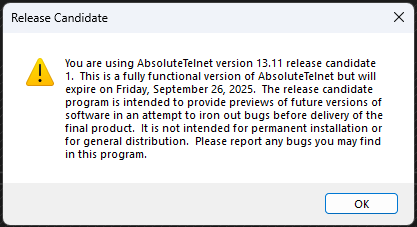
By that time, either a NEW release candidate will be announced (on this page) or the release candidate will become final and posted to the normal download section of the website.
Current Release Candidate: AbsoluteTelnet 14.01 RC11
Deployed Date: August 6, 2026
Expiration Date: August 28, 2026
Download links:
This release candidate for version 13.17 contains the following changes:
RC1
- Implemented Bracketed Paste MIME
- Implemented Kitty style ClipboardImplemented OSC52 keyboard
- Fully populate capabilities exposed through XTGETTCAP
- Implemented DECRQCRA – host queries checksum for a rectangular area of the screen
- Fix implementation of DECRQSS – host requests information about a specific mode
- Implement support for Kitty styled and colored underlines
- Implement Italic text attribute
- Added support for color Emoji
- Added in-band window resizing
- Better support for symbols not supported in most fixed-width fonts
- Enhanced speed by decoupling socket workers from UI updates
- Added popup ‘toast’ when data is copied to the clipboard
- Add support for XTVERSION – send application name and version to host
- Fixed caret rendering issue when ESO is used.
- Fixed problem with scrollbar caused by 13.16
RC2
- Implemented sixel graphics within the terminal
- Implemented kitty keyboard protocol
- Fixed a few display glitches in RC1
- pixel calculations in pty-req and window change SSH messages are now accurate
- Disable scrollbar and scrollback when alt screen is enabled (claude fullscreen tui)
- Add some missing xterm key bindings.
RC3
- Fixed display glitch in RC1/RC2
RC4
- Wrap webauthn (for fido keys) in a dynamic loader so we can load under wine on linux
RC5
- Fix TAPI device enumeration quirk that surfaced under WINE
- Fixed remote mouse behavior for btop & claude
- override remote mouse by holding shift key
RC6
- Fixed CISCO switch compatibility problem caused by sending SSH channel window adjustment messages earlier than expected.
- Implement DEC private mode 1016 (mouse reports in pixel coordinates)
- Add support for kitty pointer types
- minimal viable implementation of kitty graphics
RC7
- Gracefully reconnect to D2D for color emoji when needed
- Implement OSC8 hyperlinks
RC8
- Fix ‘copy on select’ so that it respects selection extension
- Tweak location of ‘copy on paste’ text for remote clipboard operations
- Clear local selection when clicks are sent to remote host
RC9
- Optimize terminal throughput. Most noticeable on graphic and ascii animations
- Fix SSH bug where changing window size too early would break the SSH connection
- Paste images (screenshots) and files directly into a remote session over SFTP.
- Add Windows 9001 style keyboard events
- Add cursor style control (DECSCUSR) Apps can now set cursor shape (block/underline/beam) and blink.
- Set initial pty settings (iutf8, verase) to match what the terminal sends
- Add ‘visual’ bell
- Add some missing xterm key combinations
- Add support for xterm ‘modifyOtherKeys’
- Fixed sixel background color handling
- Fixed sixel ‘scrolling’ directive, which was inverted
- Optimizations for the escape sequence parser.
- Deprecate use of ‘Terminal’ font
- Get spacing of Kitty graphics right
- Other optimizations and bug fixes
RC10
- Fixed problem where links would be identified on every other line
- Fixed bug with OSC8 Hyperlinks
- Fixed issue where locally identified hyperlinks would collide with OSC8 hyperlinks
- Rename ‘ansi mode’ to ‘dark mode’ which is what it really is.
- use on-screen prompting instead of popups when it makes sense. Avoids window creation, ownership, destruction and lifo issues.
RC11
- Added a ‘What Changed’ feature to the ‘do you want to save your changes’ dialog
- Optimizations for notcurses
- More owner drawn characters (triangles, octants)
- Adjust braille spacing so it looks more bitmappy
- Add xtpushcolors, xtpopcolors, xtreportcolors
- Add support for kitty graphics animation frames