Your Terminal Just Grew Up. Literally.
AbsoluteTelnet/SSH 14.07 brings big text, small text, and everything in between to the command line.
For fifty years, terminals have had one rule that nobody questioned: every character is the same size as every other character. One grid, one size, no exceptions. It’s why terminal apps build headlines out of ===== and ASCII art, and why a “big” title in a text UI is really just the same letters with more space around them.
Not anymore.
AbsoluteTelnet/SSH 14.07 adds full support for the text sizing protocol — a modern terminal standard that lets programs ask for text at double size, triple size, half size, and dozens of gradations in between. Superscripts. Subscripts. Actual headlines. In a terminal window. Over SSH.
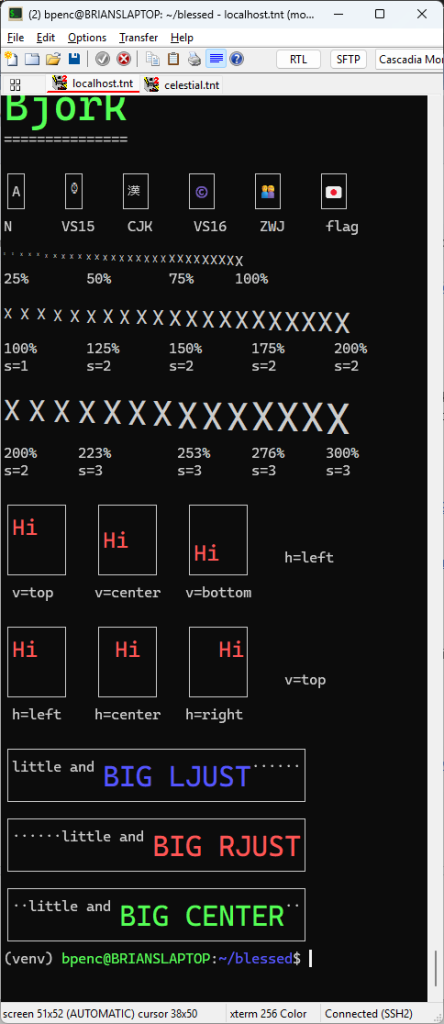
See it for yourself
▎
▎ Every size on this screen is real text — selectable, copyable, live. Not an image, not ASCII art.
That’s a standard test suite from the blessed Python library, running unmodified over SSH into AbsoluteTelnet. Big text, small text, text nudged to the top, bottom, or centre of its own space, and long banners justified left, right, and centre — all of it drawn by the terminal, all of it still ordinary text underneath.
And now, the fun part
Because if you’re going to render text at any size you like, somebody is going to build a demoscene scroller with it. Somebody did.
▎ [VIDEO: blessed scroller.py running in AbsoluteTelnet — the sine-wave scroller with per-character size sweep, fire-gradient colours, and the block/CJK/emoji message]
▎
▎ A sine wave of text, every character a different size, animating in real time — inside an SSH session.
Every letter in that wave is independently sized, coloured, and positioned, updating continuously. It’s showing off, and that’s rather the point: a terminal that can do this smoothly can certainly handle a bold heading in your log viewer.
We’re rather proud of one detail here. The reference implementation quantises small text down to a handful of fixed sizes. AbsoluteTelnet renders the full range — so where other terminals step, ours sweeps.
It’s not just eye candy
There’s a serious problem hiding behind the pretty demo.
Terminal programs have always had to guess how much space a character will take up. Emoji, Asian scripts, flags, combining accents — every terminal and every program carries its own idea of the answer, and when they disagree, your carefully drawn interface falls apart into misaligned garbage. Anyone who has watched a text UI shred itself over an emoji knows the feeling.
The text sizing protocol fixes that at the root. Programs can now simply tell the terminal how much room to use, and the terminal obeys. No guessing, no disagreement, no shredded layout. That half of the feature will never win a beauty contest, but it quietly makes a whole category of frustrating bugs impossible.
Try it in ten seconds
Connect to any Unix host through AbsoluteTelnet 14.07 and paste this:
printf “\e]66;s=2;Double sized text\a\n\n”
printf “\e]66;s=3;Triple sized text\a\n\n\n”
That’s it. No configuration, no setting to enable — it’s simply on.
A very short list
Support for this protocol is rare. Only a couple of terminals in the world implement it, all of them on Linux and macOS. As far as we’re aware, AbsoluteTelnet/SSH is the first Windows terminal to support it — and the only one you can point at a production SSH server behind a corporate firewall.
We verified our implementation character by character against the reference terminal, and where we deliberately differ, we differ on purpose and for good reasons.
AbsoluteTelnet/SSH 14.07 is available now. [Download it here] — existing customers with a current maintenance subscription, it’s a free update.